01 · DISCOVER
Customization Catalogue
Search the local catalogue and open the object you need.
Free browser toolkit for NetSuite
Inspect NetSuite records, explore customizations, save local snapshots and compare environments — all in one browser workspace.
Completely free · Chrome & Brave · Runs locally in your browser
What’s new in 1.0.0HOVER TO EXPLORE
Move over a preview or focus it with the keyboard. Each short scene is rendered live with fictional data — no video download and no customer account content.
Search the local catalogue and open the object you need.
Open the current record and find a field in seconds.
Add a customization and turn it into release-ready work.
Hover a card to play · Focus or tap for touch and keyboard
ONE PRACTICAL TOOLKIT
Focused tools for administrators, developers and consultants who want to understand an account faster and repeat fewer manual steps.
Search fields, custom records, lists, scripts and workflows from locally stored account snapshots.
Find a customization.
See the details behind it.
Try the search and filters, then select a result.

Search and inspect metadata stored locally for your NetSuite accounts.
| Name / Script ID | Type / account |
|---|
No matches. Try a name such as “approval” or choose another category.
Actual SuiteCraft interface with fictional sample data. Click the image to enlarge.
Actual SuiteCraft interface with fictional sample data. Click the image to enlarge.
Actual SuiteCraft interface with fictional sample data. Click the image to enlarge.
Actual SuiteCraft interface with fictional sample data. Click the image to enlarge.
Actual SuiteCraft interface with fictional sample data. Click the image to enlarge.
Choose an account, search and select a result.Fictional sample data

SMALL WINDOW. PRACTICAL SHORTCUTS.
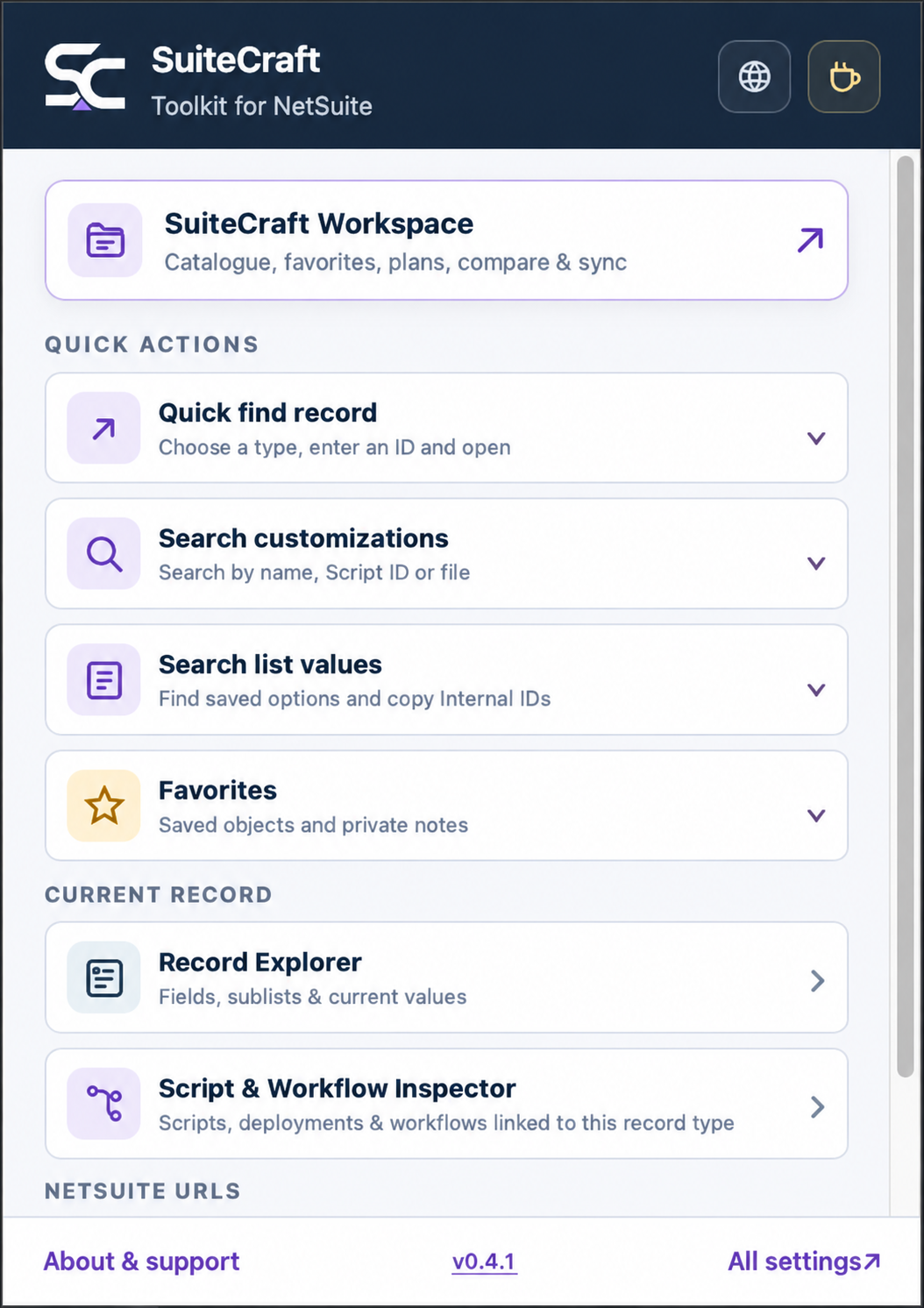
Meet the SuiteCraft popup. Find a record, search saved customizations or reach your favorite objects without losing your place.
Interactive preview · Fictional data
No NetSuite connection. Your real account is untouched.
Preview only — this opens sample details inside the demo.
Search the sample account’s latest local snapshots.
Showing Favorites from fictional local accounts.
Switching updates this preview only.
Choose a scene or explore the popup yourself.
RIGHT WHERE YOU WORK
SuiteCraft shortcuts live alongside your NetSuite work. Try search, inspect a field, explore scripts or save a reference — without leaving this sample page.
The SC icon in the menu finds menus, fields & Workspace data.
Inspect fields and scripts, add a plan reference or save a favorite.
NS-500001
Click a shortcut beside the record title, or choose a tool above.
EXPLORE EVERY DETAIL
Explore all 12 product screens, with feature descriptions and full-size previews.
Inspect body fields, sublists and current values, filter native and custom fields, and open synchronized field definitions.
See scripts, deployments and workflows linked to the current record type, with IDs, entry points and workflow activity.
See what was added, removed or changed between environments or points in time, down to practical properties and SDF XML.
Save frequently used NetSuite objects with private notes and find them quickly from the popup or Workspace.
Prepare releases with target readiness checks, item statuses, notes, links and Markdown, CSV or JSON exports.
Keep SuiteCraft shortcuts close to the record title and optionally wrap crowded NetSuite action bars across multiple rows.
Copy or switch between System and Debugger URL variants without rebuilding the address by hand.
Keep standard lists and custom record options close. Search values, copy Internal IDs and export local copies as CSV or Excel.
Find menu destinations with full paths, fields on the current form by label or field ID, and local Favorites, catalogue objects and list values. Use All or a focused scope, locate fields, copy IDs and open full results in Workspace.
Choose light or dark mode for Workspace and Settings, read illustrated feature descriptions and enable the tools you need. Embedded NetSuite tools keep their light appearance.
Choose a record type, enter an Internal ID, exact name or supported Script ID, and open the record in a new tab. Use the extension popup or the shortcut beside SuiteCraft Search, which carries your entered ID into the record finder.
Give local accounts and roles recognizable names and remove downloaded data for a chosen scope. Keep account identities, Favorites and Change Plans intact.
DESIGNED WITH CLIENT WORK IN MIND
SuiteCraft works through an already authenticated NetSuite browser tab. Catalogue snapshots, saved reference values, Favorites, Change Plans and notes are stored locally and are not sent to a SuiteCraft backend. Small interface preferences may sync through your browser profile.
Read the complete privacy policyNo SuiteCraft cloud accountYour work does not depend on a separate service.
On-demand synchronizationYou decide when account metadata is refreshed.
Portable local backupsExport and restore your settings and snapshots with versioned JSON backups.
Explore with sample data. All interactive demonstrations use fictional data and do not connect to your NetSuite account.
WHAT’S NEW
First official release, safer local data and more reliable synchronization.
Released
Browse all versions and their detailed release notes.
CHROME WEB STORE
SuiteCraft is available through its Chrome Web Store link. Install the extension and open a NetSuite page where you are already signed in.

INDEPENDENTLY BUILT
I’m Damian Krolikowski, a freelance NetSuite technical consultant and developer, and the creator of SuiteCraft. I help teams with NetSuite development, customizations and technical troubleshooting.
SuiteCraft grew out of the small frustrations that add up during everyday NetSuite work. Need help with a NetSuite project? Get in touch to discuss the scope and how I can help.